6 Inspiring Lesson Plans for Teaching STEM with Interactive Simulations
 Lucie Renard —
We’re excited to announce a new step forward in interactive STEM education: BookWidgets now integrates seamlessly with PhET Interactive Simulations. 🎉 PhET, developed by the University of Colorado Boulder, is well known for its high-quality, research-based science and math simulations. By combining PhET simulations with BookWidgets’ interactive question types, teachers can now design fully guided, inquiry-based science lessons — all in one place. We saw that a lot of you were already using PhET simulations within BookWidgets! So why not make it even easier for you to add them to your BookWidgets lessons with an integration?
This partnership makes it easier than ever to turn simulations into structured learning experiences, complete with instructions, guiding questions, feedback, and assessment. And that's exactly what you'll learn in this blog post. You'll learn how to design engaging science lessons with interactive simulations! You can even use the ready-made science lesson examples and share them with your students.
📹 Stream our webinar & learn everything about creating engaging digital science assignments with PhET simulations!
Content & Ready-to-use STEM lesson plans in this blog post
Here's an overview of the content of this blog post. You can open the lesson activities directly here, or find them further down in this blog post, where you’ll also find more explanations and ideas for differentiation.
- Why use PhET simulations in your lessons — and inside BookWidgets?
- 6 Ready-to-use STEM lessons with PhET simulations in BookWidgets
- Structured multimedia Quiz about the greenhouse effect
- WebQuest about the evolution theory and survival of the fittest
- Split Worksheet about motion in two dimensions
- Split Worksheet with density measurement simultation
- Split Worksheet with simulation about series circuits
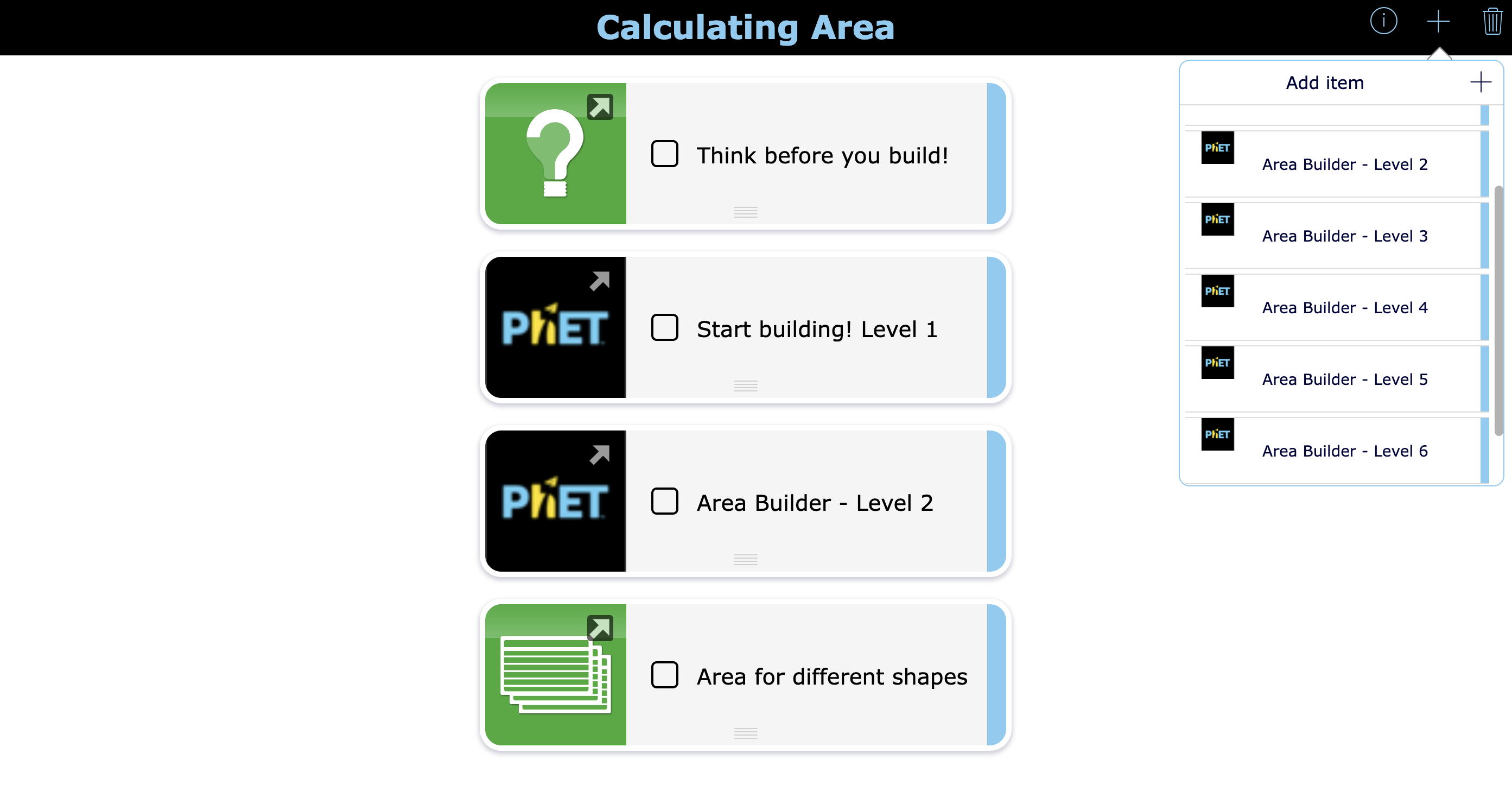
- Planner wiget with a learning path about calculating an area
- How to build your own simulation science lessons?
💡 Before we begin: The example science lessons in this blog post are made with BookWidgets. You can use them for free or design your own fun lesson ideas. Click this group link, log into your BookWidgets account (or create one), and you'll find all the activities listed in the group. After duplicating, you can make changes to the activity to customize it for your students.
Why use PhET simulations in your lessons - and inside BookWidgets?
1. Abstract concepts become visible
PhET simulations help students see what normally remains invisible — think electric current, molecular density, forces, or greenhouse gases.
2. Active learning instead of passive watching
Students don’t just observe; they manipulate variables, test hypotheses, and explore cause-and-effect relationships.
3. Guided inquiry with BookWidgets
By embedding simulations in BookWidgets, you can:
- Add step-by-step instructions
- Ask prediction and reflection questions
- Combine simulations with Quizzes, WebQuests, open questions, and self-assessment rubrics
- Automatically collect and review student answers
4. One tool, one workflow
No more jumping between platforms. For both teachers in their lesson creation process and for students when experimenting with the simulations. Students open one widget and everything is there: the simulation, the questions, and the feedback.
6 Ready-to-use STEM lessons with PhET simulations in BookWidgets
Below are concrete lesson examples where PhET simulations are embedded directly into BookWidgets activities. You can explore each lesson by clicking the image. Keep in mind that you can find all these lesson ideas for free in this BookWidgets group. Create an account, duplicate the widget, change the settings, and even change the language before sharing it with your students.
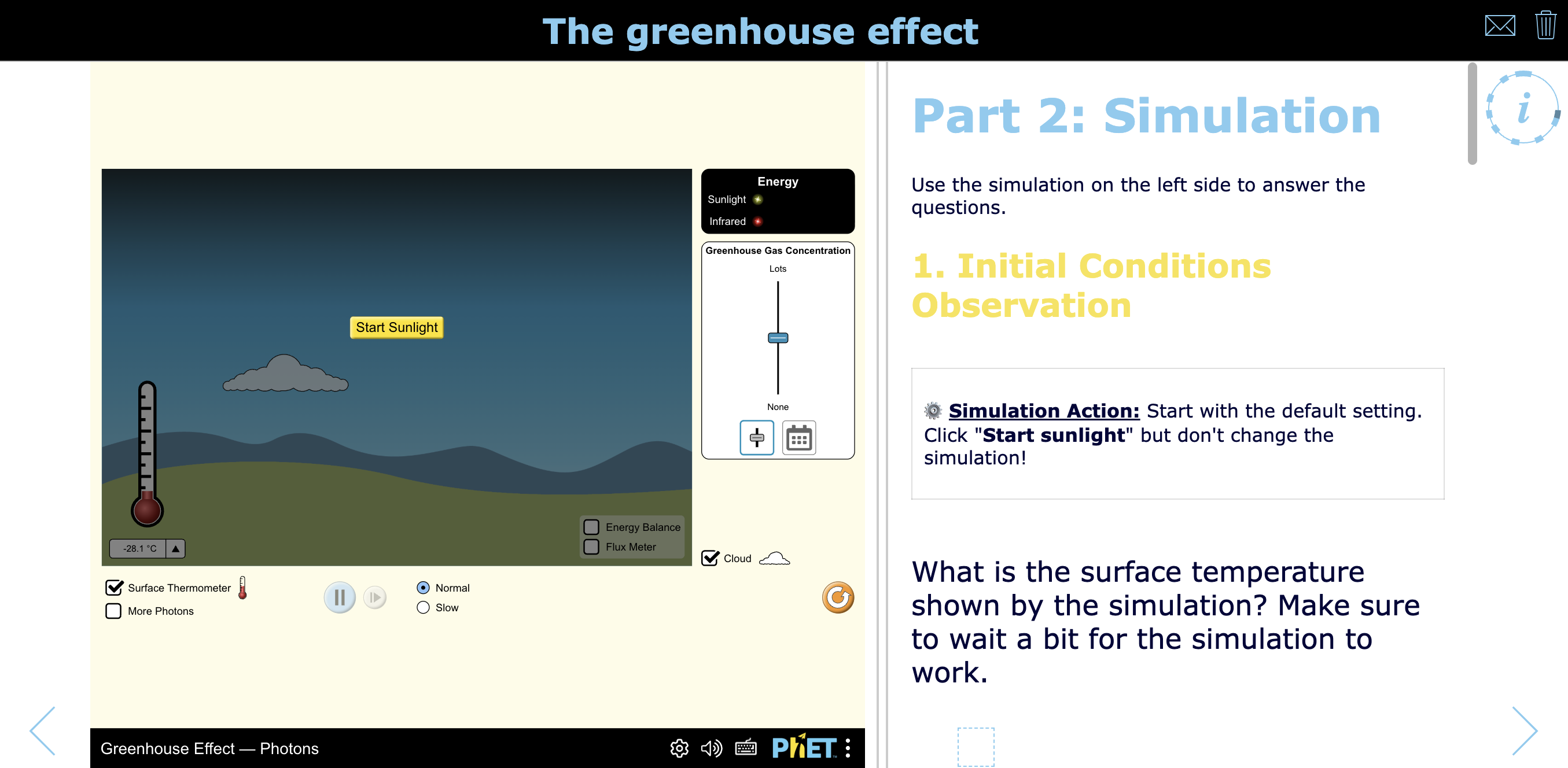
1. The greenhouse effect
- Best for : Middle and high school science students learning about climate change and the greenhouse effect.
- Learning Goal : Understand how greenhouse gases influence Earth's temperature by exploring energy flow and observing the relationship between greenhouse gas concentrations and global warming.
- BookWidgets Widget Type : (Structured Multimedia) Quiz
- Time Needed : 25-35 minutes
- Why It Works : Students actively manipulate greenhouse gas levels in an interactive simulation and immediately apply their observations through guided, auto-graded quiz questions. This inquiry-based approach strengthens conceptual understanding while providing instant feedback.
- Teacher Tip : Encourage students to predict the effects of changing greenhouse gas levels before running the simulation, then compare their predictions with the observed results.
- Differentiation Idea : Challenge advanced learners to explain the underlying energy transfer processes or relate the simulation to current climate data, while providing scaffolded hints or vocabulary support for students who need additional guidance.
This interactive climate science quiz pairs BookWidgets' Quiz widget with PhET’s Greenhouse Effect simulation. Students experiment with greenhouse gas levels, see real-time temperature impacts, and demonstrate understanding of energy flow and global warming through guided (and autograded!) quiz questions.
2. Survival of the fittest
- Best for : Middle and high school biology students studying evolution and natural selection.
- Learning Goal : Understand adaptation, variation, and survival of the fittest by analyzing how environmental factors influence survival rates and linking simulation outcomes to evolutionary theory.
- BookWidgets Widget Type : WebQuest
- Time Needed : 30–45 minutes
- Why It Works : The PhET simulation makes abstract evolutionary processes visible and testable, while the WebQuest structure guides students to interpret results and connect them to real-world biological concepts.
- Teacher Tip : Have students pause at key simulation stages to justify why certain traits increase survival before moving forward.
- Differentiation Idea : Provide sentence starters and guided questions for support learners, while asking advanced students to compare natural selection in different environmental scenarios or species.
Pairing PhET's Natural Selection simulation with our WebQuest makes your genetics lesson hands on - without filling your room with bunnies. Students explore adaptation, variation, and survival by testing how environmental factors affect survival rates, then use guided questions to connect simulation results to evolutionary theory and real-world examples.

3. Motion in two dimensions
- Best for : Secondary physics students studying mechanics and motion.
- Learning Goal : Understand two-dimensional motion by analyzing projectile motion, vector components, and the relationship between graphs, equations, and real-time simulation data.
- BookWidgets Widget Type : Split Worksheet
- Time Needed : 25-35 minutes
- Why It Works : The PhET simulation makes abstract vector concepts visible and interactive, allowing students to test variables like angle and velocity while immediately connecting results to guided analytical questions.
- Teacher Tip : Ask students to predict the trajectory before running each simulation and then justify any differences between their predictions and observed results.
- Differentiation Idea : Provide step-by-step support for resolving vectors for struggling learners, while challenging advanced students to derive and explain the underlying equations of motion.
Students dive into two-dimensional motion using a PhET's Projectile Motion simulation embedded in a BookWidgets lesson. By analyzing vectors and real-time data, they explore projectile motion and vector components while guided questions prompt graph interpretation, equation connections, and clear explanations of physical principles.

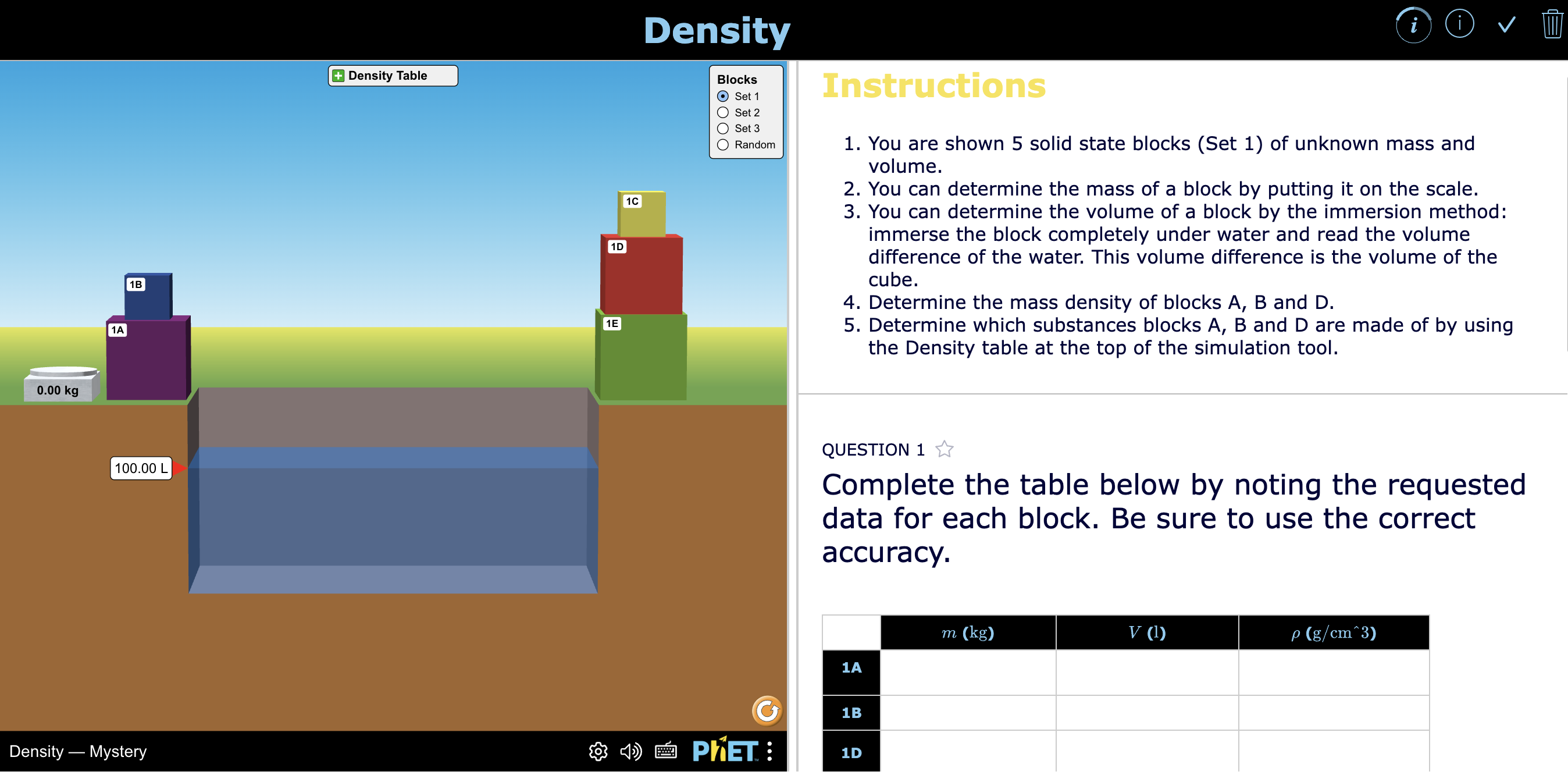
4. Density
- Best for : Middle school science students exploring basic physical properties of matter.
- Learning Goal : Understand the relationship between mass, volume, and density, and explain how density determines whether objects float or sink.
- BookWidgets Widget Type : Split Worksheet
- Time Needed : 30–45 minutes
- Why It Works : The PhET simulation makes an abstract concept like density concrete by letting students manipulate objects and immediately observe floating and sinking behavior, reinforcing the mass–volume relationship through inquiry.
- Differentiation Idea : Provide formula scaffolds and guided calculation steps for support learners.
An interactive science lesson on density using a PhET simulation, where students explore mass, volume, and floating behavior through guided questions. In this lesson, students manipulate objects with different masses and volumes to discover how density affects floating and sinking. BookWidgets questions guide students to calculate density, make predictions, and reflect on their observations.
5. Currents in a series circuit
- Best for : Secondary physics students learning basic electricity concepts.
- Learning Goal : Understand how current and voltage behave in series circuits and explain why current remains constant throughout a series circuit.
- BookWidgets Widget Type : Structured Multimedia Quiz
- Time Needed : 30–45 minutes
- Why It Works : The PhET simulation allows students to build and modify circuits in real time, making the abstract concept of current flow visible while reinforcing cause-and-effect relationships through guided questioning.
- Teacher Tip : Have students physically redraw their circuits and label current at different points to reinforce the idea that current remains constant in series circuits.
- Differentiation Idea : Support learners with step-by-step circuit-building instructions, while challenging advanced students to compare series and parallel circuits in terms of current and resistance behavior.
Focused on core electricity concepts, this lesson uses PhET's Circuit Construction Kit simulation to explore current and voltage in series circuits. As learners build and modify a series circuit, guided questions prompt them to explain how and why current remains consistent throughout the circuit.

6. Calculating area
- Best for : Primary school students learning basic geometry.
- Learning Goal : Understand and calculate area by exploring how shapes can be built and measured using unit squares in an interactive environment.
- BookWidgets Widget Type : Planner widget
- Time Needed : 20–30 minutes
- Why It Works : The PhET Area Builder simulation turns an abstract concept into a hands-on experience, allowing students to physically construct shapes and immediately see how area is formed and calculated.
- Teacher Tip : Encourage students to explain how they know two different shapes can have the same area, even if they look different.
- Differentiation Idea : Additional exercises of varying difficulty levels are already included in the Planner. Students can add these to their personal planner using the + icon in the upper right corner, depending on their pace and proficiency level.
Discover how to create interactive math lessons with PhET simulations in a Planner widget from BookWidgets. This lesson plan teaches primary school students to calculate area. The Area Builder simulation game inside a Planner widget helps students understand and calculate area through hands-on exploration and guided tasks.
How to build your own simulation science lessons?
Using PhET simulations in BookWidgets is simple and flexible, especially if you are already a widgeteer. If you're new to BookWidgets, I advice your to check out one of the free webinars for beginners inside your learning management system or through the BookWidgets website.
Here's how the PhET integration works in BookWidgets:
Step 1: Choose a widget where you can add STEM simulations
You can add simulations in BookWidgets wherever you can embed a website. But BookWidgets also built an integration user interface that makes it easier for you to choose PhET simulations according to your subject, grade level, and language.
You can add simulations in these widgets: Quiz, Worksheet, Split Worksheet, WebQuest, Planner, and the Hotspot Image.
Step 2: Open the simulation configuration sc to the widget
In these widgets - Quiz, Worksheet, Split Worksheet, there are 2 ways to add STEM simulations.
You can add them as a resource (web embed) or you can add them in a rich text field.

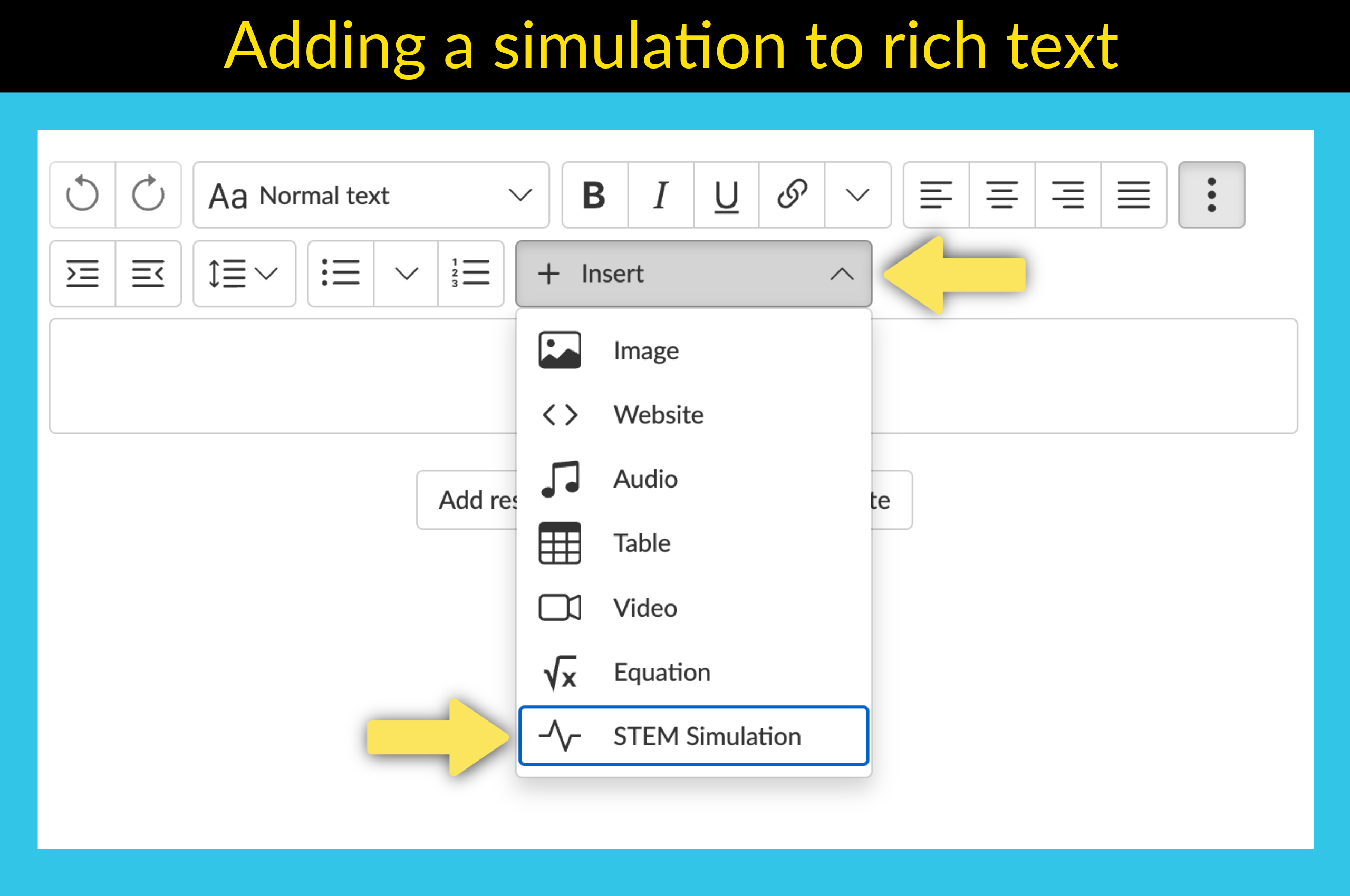
Side note: Adding simulations by using a rich text field works in every widget and question type where rich text is enabled or where you can switch to rich text. This is also the way to go when adding simulations to a WebQuest widget.
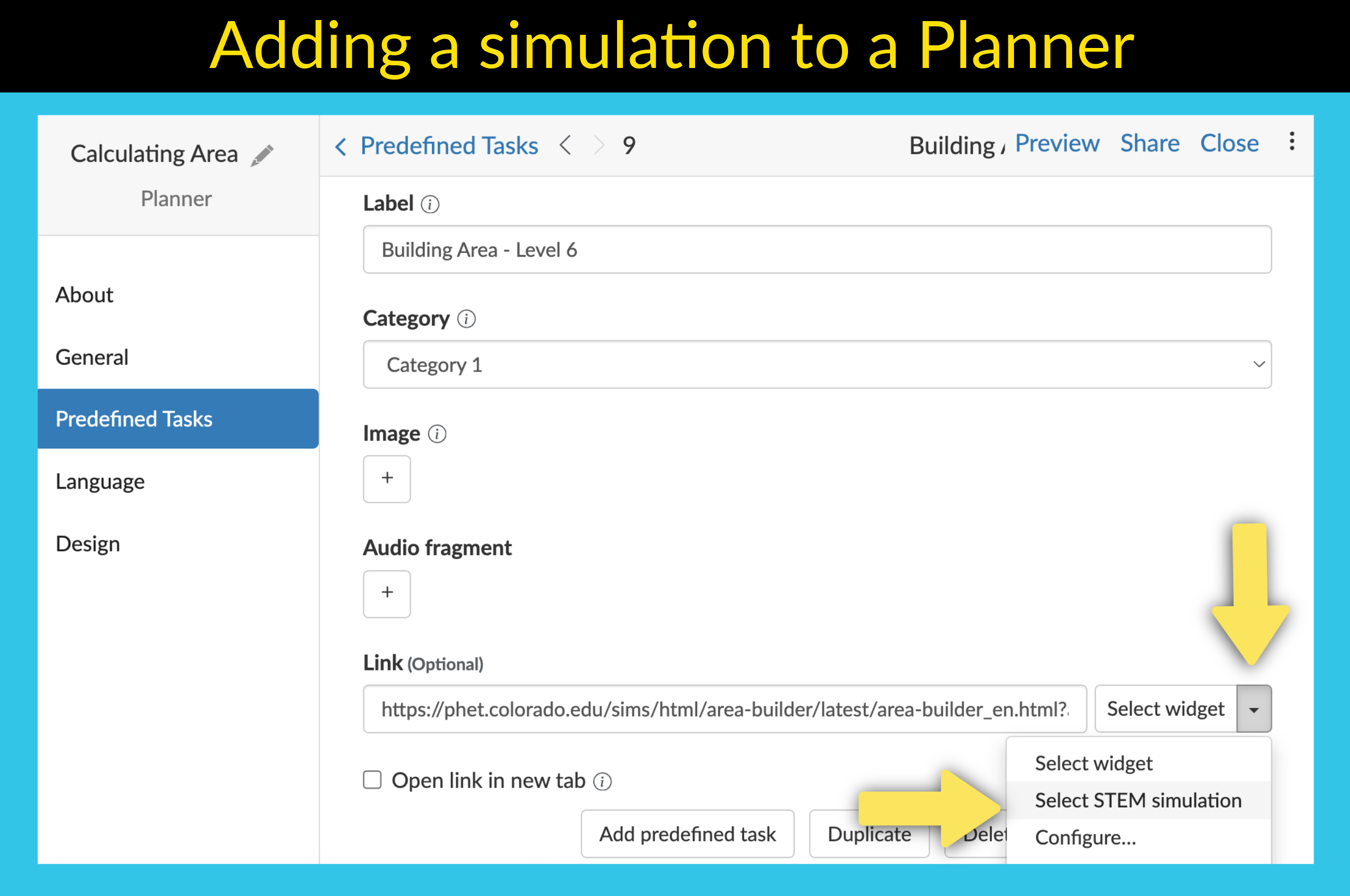
In a Planner, you can click the small arrow next to Select widget for your task and choose STEM simulation
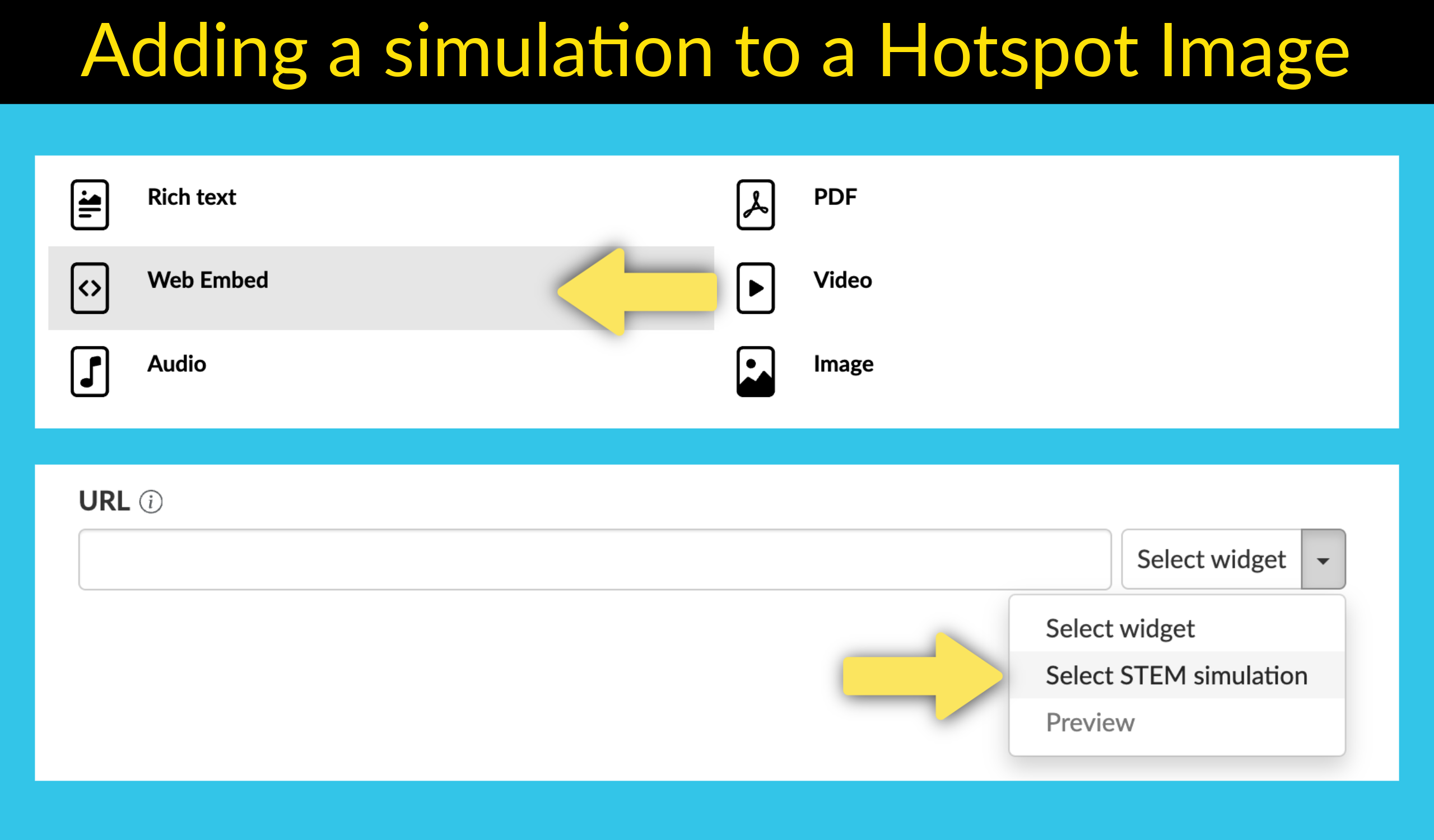
In a Hotspot Image widget, you choose a web embed pop-up and click the small arrow next to Select widget and choose STEM simulation
Step 3: Make your choice in the PhET user interface
When opening the STEM simulations panel, you can use a filter to find the simulation you need. Here's a screenshot to show you how this looks.

Step 4: Customize the simulations
After choosing your science simulation, you can click the gear icon to make some small changes. In some cases, you immediately get a configuration screen. Here, you can choose on which screen the simulation needs to start. Some simulations have multiple setups, so you need to pick the one that's most suited for your lesson.

Step 5: Add questions your students need to answer
If you know, you know. In BookWidgets, you can add over 35 different interactive question types to engage your students even more. Choose question types and ask questions that encourage your students to use the simulation, play with it, and experiment with it. Ask for observations, analyses, hypotheses, calculations, reflections, and so on. Combine theory with practice.
Wrap-up: Turn simulations into powerful science lessons
PhET simulations are an excellent starting point for inquiry-based STEM learning — and with BookWidgets, they become complete, interactive lessons that guide students from exploration to understanding. Ready to build your own simulation-based lesson? 👉 Start creating with PhET simulations in BookWidgets today and transform hands-on exploration into meaningful learning experiences.
Remember to navigate to this BookWidgets group to the 6 free science lesson plans I shared above.
Want to learn more about creating engaging lesson activities with BookWidgets?
✔️ Follow BookWidgets on X / Twitter and LinkedIn and join our teacher community on Facebook!
✔️ And, be sure to connect with me on LinkedIn! 👋


