Amplifying the traditional classroom with ICT
 Theresa Spannbauer —
In today’s rapidly evolving educational landscape, integrating ICT in the classroom is no longer optional — it's essential. Digital tools have the power to transform traditional lessons into interactive learning experiences, saving teachers valuable time and boosting student engagement. One powerful way to do this is by digitizing existing materials like quizzes and worksheets. That’s where BookWidgets’ Word and PDF importer becomes a game-changer. This feature allows educators to convert paper-based tests into digital quizzes quickly and efficiently, enhancing both teaching workflow and student feedback.
Whether you're teaching in a physical classroom, a hybrid setup, or a fully online environment, this approach can help you modernize your assessments, reduce repetitive work, and tap into the benefits of auto-graded digital tools.
7 things to expect from the perfect teaching tool
First I made a list what I expect from a program app/or whatever:
- different platforms an devices (app & browser-based / Chromebooks - Pc's - Tablets - Smartphones)
- easy to use for me
- easy to use for the kids
- ability to share content with colleagues
- a variety of tools in one program (even though I mostly use the quizzes...having different options is great!)
- option to give feedback
- self-paced learning
Verdict
I am not quite sure how I first found out about BookWidgets I remember hearing about Bookwidgets from a colleague, meeting the guys from BookWidgets, and reading their blog but I am not sure anymore which came first... This program however made me check all of the points of my checklist!
So, here is an example of what my material looks like:
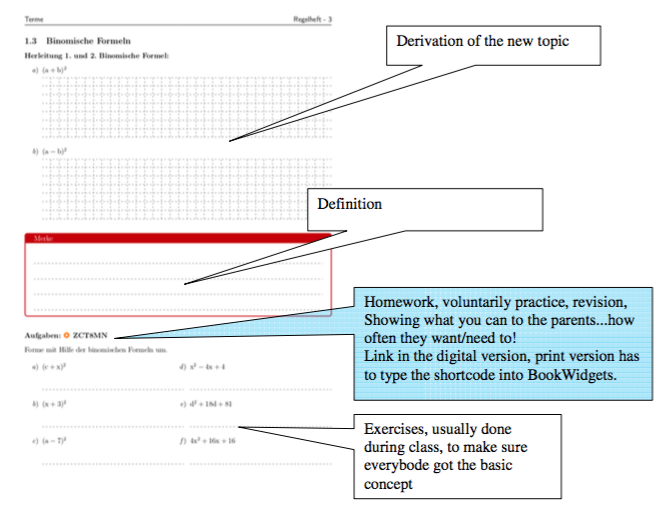
No, it is not something extremely new or fancy. But, BookWidgets allows me to assign exercises to every part of a subject or tasks for revision at the end of the chapter.
And, by providing automatic feedback to my students, they know what they need to ask in the following lesson. We are losing no more time checking every single part of the assignments, just the parts that the students were struggling with.
Digitize your tests instantly with BookWidgets' word & PDF importer
One of the most effective ways to enhance classroom efficiency with ICT is by transforming traditional paper-based resources into interactive digital exercises. Thanks to BookWidgets' Word and PDF Importer, teachers can now import quizzes and worksheets directly from Microsoft Word or PDF files and convert them into auto-gradable digital assessments.
This feature allows you to quickly transition from traditional teaching materials to interactive, ICT-integrated learning tools without the need to recreate everything from scratch. Here's how it works:
Select a Widget Type: Start by creating a new widget in BookWidgets. The importer works with Quiz, Worksheet, and Split Worksheet formats ideal for most educational purposes.
Import Your Document: Click the gear icon in the widget editor and select “Import from document.” You can upload .docx or .pdf files. If your document is in a different format (like Google Docs), convert it first.
Highlight and Label Content: Use your mouse to highlight text in your uploaded document. You’ll label each part: questions, answers, instructions, images, or tables. For example, highlight a multiple-choice question and its options, and BookWidgets will auto-structure it.
Auto-Grading Made Simple: Once questions are imported, you can configure correct answers to activate BookWidgets’ powerful auto-correction features. This includes question types like multiple choice, fill-in-the-blanks, drag-and-drop, equation-based questions, and more.
Customize and Share: Add scoring, hints, rationale, and more. Then, finalize the widget settings and share the interactive test with your students.
With just a few clicks, you’ve turned a static paper quiz into a dynamic, auto-graded digital resource fully optimized for today's ICT-enhanced classroom.
For me, digitalisation doesn‘t mean to get rid of everything analog, but to embrace and use the advantages it offers to my students and to myself.


